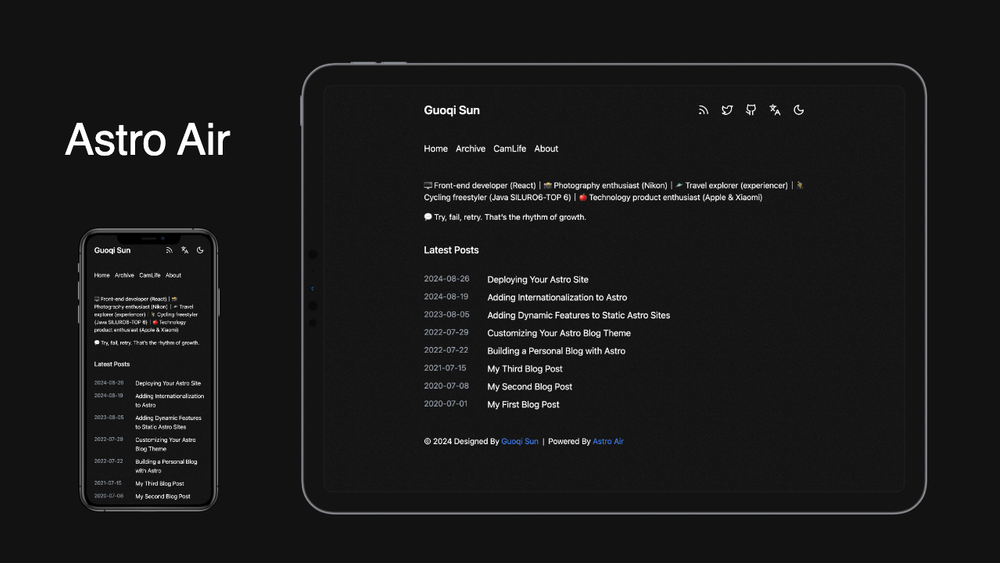
Astro Air is a minimalism, personal blog theme for Astro, designed to provide a clean and responsive blogging experience. It emphasizes simplicity and performance, making it an excellent choice for developers looking to quickly set up a personal blog.
If you find this project helpful, please consider giving it a star ⭐️
Showcase
Welcome to add your own blog to the list ❤️
Features
- 🌓 Dark mode support
- 📱 Fully device responsive
- 🎨 Clean and minimalist design
- 📝 Markdown/MDX for content authoring
- 🏄♂️ SSG static rendering, SEO friendly
- 🌐 i18n support (EN/ZH)
- 🔗 Social media integration
- 📰 RSS feed & sitemap support
- 🛠️ Google analysis integration
- 💬 Commenting Integration (Twikoo)
- 🎨 Enhance Transition and Animation
- 🔍 Local search functionality (planned)
- ...and more
Quick Start
Deploy your own Astro Air blog instantly with Vercel or Netlify:

Configuration
- Open
src/config/index.tsand customize your site settings. - Open
src/config/links.tsand customize your site links. - Open
src/config/zh(en)/about.mdx(intro.mdx、links.mdx)and customize your pages content.
Writing Content
- Create new blog posts in the
src/content/posts/directory. - Use the following frontmatter template:
---
title: "Your Post Title"
description: "A brief description of your post"
pubDate: YYYY-MM-DD
updatedDate(optional): YYYY-MM-DD
tags(optional): ["tag1", "tag2"]
ogImage(optional): "cover image URL"
---

Your content here...Update Theme
To keep your theme up-to-date with the latest changes from the upstream repository:
git remote add upstream https://github.com/sun0225SUN/astro-air
git fetch upstream
git merge upstream/main --allow-unrelated-historiesContributing
Contributions are welcome! Feel free to:
- Fork the repository
- Create your feature branch
- Submit a pull request
To set up the development environment:
git clone https://github.com/sun0225SUN/astro-air
cd astro-air
pnpm install
pnpm devLicense
This project is licensed under the MIT License - see the LICENSE file for details.