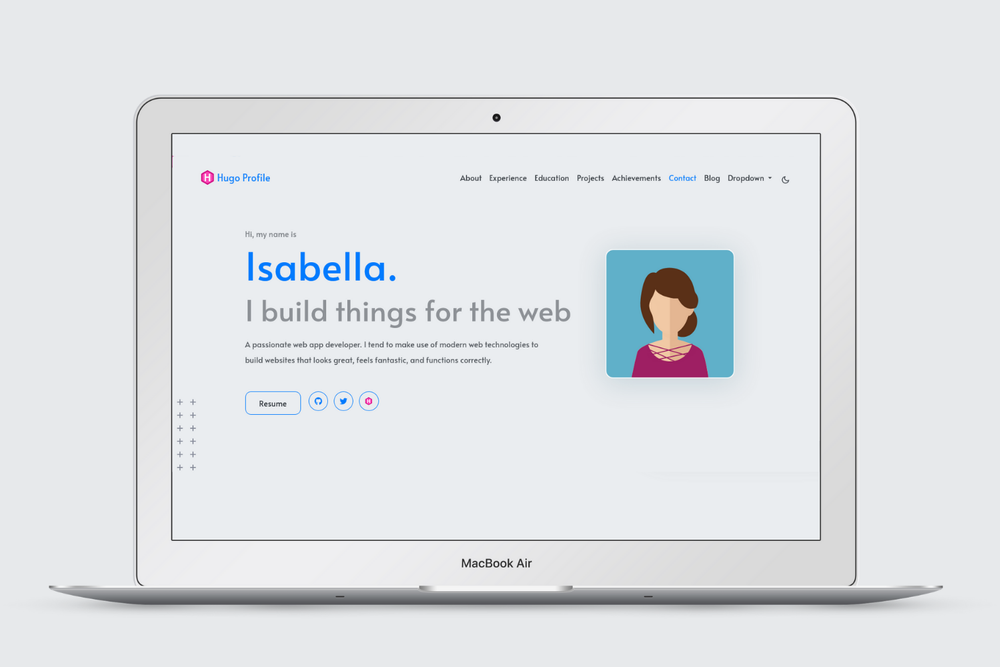
Hugo Profile is a high-performance, mobile-first Hugo theme designed for creating personal portfolios and blogs. It offers extensive customization options and a clean, minimalist aesthetic.
Key Features:
- Responsive Design: Ensures your site looks great on any device, from desktops to mobile phones.
- Minimalist & SEO Friendly: A clean design approach combined with built-in SEO optimizations helps your content rank better.
- Theme Customization: Supports Light, Dark, and Automatic theme color configurations to match user preferences.
- Content Management: Includes support for categories and tags, making content organization and discovery straightforward.
- Integrations: Seamlessly integrates with Google Analytics for tracking, Disqus for comments, and FormSpree for contact forms.
- Technology Stack: Built using Bootstrap and Font Awesome for a robust and visually appealing foundation.
Requirements:
To use Hugo Profile, you need Hugo version 0.87.0 or higher installed on your system. You can verify your Hugo version by running hugo version. If not installed, refer to the official Hugo installation guide.
Quick Start Guide:
- Initialize Hugo Site: Create a new Hugo project using
hugo new site my-site --format="yaml". - Add the Theme: Integrate Hugo Profile by either cloning the repository into your
themesfolder (cd my-site/themes && git clone https://github.com/gurusabarish/hugo-profile.git) or adding it as a Git submodule (cd my-site && git init && git submodule add https://github.com/gurusabarish/hugo-profile.git themes/hugo-profile). - Configure: Copy the example configuration file to your site's root:
cp -f themes/hugo-profile/exampleSite/hugo.yaml ./hugo.yaml. - Develop: Start the local development server with
hugo serverto preview your site. - Populate Content: For a complete example site view, copy static assets and content from the theme's
exampleSitedirectory:rsync -av themes/hugo-profile/exampleSite/static/ ./static/andrsync -av themes/hugo-profile/exampleSite/content/ ./content/.
Content Management:
Customize your site by editing the hugo.yaml file for global settings and section visibility. Create new pages, such as blog posts, using hugo new content content/blogs/my-post.md. The theme's Wiki page provides additional tips.
Deployment:
For quick deployment, use the "Use this template" button on GitHub and connect to Netlify. Netlify automatically deploys changes from the exampleSite folder. If you followed the Quick Start, additional Netlify configurations might be needed. For manual deployment, run rm -rf public/ && hugo to generate the static site in the public/ folder for any hosting platform.