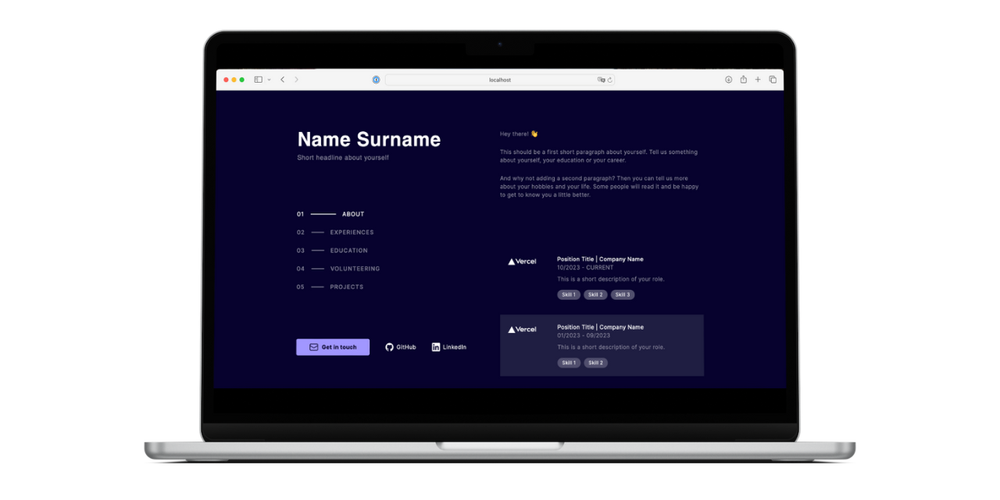
The Two-Column-Portfolio Template is a straightforward and highly customizable portfolio solution built with Next.js and Tailwind CSS. It's designed for quick setup and deployment, making it ideal for developers and designers looking to showcase their work efficiently.
Key Features
Rapid Setup: Get your portfolio live in minutes with minimal configuration.
All page content is loaded from a JSON file, allowing for easy modification without requiring coding knowledge.
Customizable Design: Effortlessly tailor the visual style to match your brand.
Colors are easily adjustable, with several presets available and simple options for adding custom color palettes.
Mobile Responsiveness: Optimized for a seamless experience across all devices.
The template is designed to look great on both desktop and mobile screens.
Easy Deployment: Leverage Vercel for straightforward hosting.
Simply fork the repository on GitHub, update your details, and deploy using Vercel's integrated GitHub deployment.
How To Use
To get started with this template, follow these command-line steps:
(The live version will be available at localhost:3000)
Build the application for production:
$ yarn build
Customization Steps
Modify the website's title and description in app/layout.js.
Personalize your details by editing translations/en.json. You can add an arbitrary number of entries for experiences (including skills), education, volunteering, and projects. The "About" section supports multiple paragraphs by creating multiple entries in the General:about array.
Replace app/favicon.ico with your preferred favicon.
(Optional) Adjust the color palette in tailwind.config.js.
(Optional) Update the imprint and privacy statement as required by your country's regulations.